Bindars
Read, highlight, and make notes on your own files.
A free reader for Markdown documents and Fountain screenplays.
Linux .deb available now. A Mac version is in preparation.

Free and open source
MIT licensed. No trial, no subscription.
No account
Open the app and start reading.
Works offline
Bindars makes no network connections.
Files stay as they are
Highlights and notes are stored separately.
Who Bindars is for
You saved something from ChatGPT or Claude
Chat assistants and Apple Notes can save documents as .md files. A text editor shows them full of # and * symbols. Bindars shows a formatted page you can highlight and annotate.
You write in plain text
If your notes or drafts are Markdown files, from Obsidian, a Bear export, or another plain-text app, open the folder in Bindars. Read them like finished pages and search all of them at once.
You're rewriting a screenplay
Read your Fountain draft in script layout, mark what isn't working, and export a list of notes to work from when you rewrite.
The notes passHighlight it, add a note, find it again
Highlights and notes work the way they do in an e-reader, on files you already have.

Highlight
Select a passage and pick one of four colors: yellow, green, blue, or pink.
Add a note
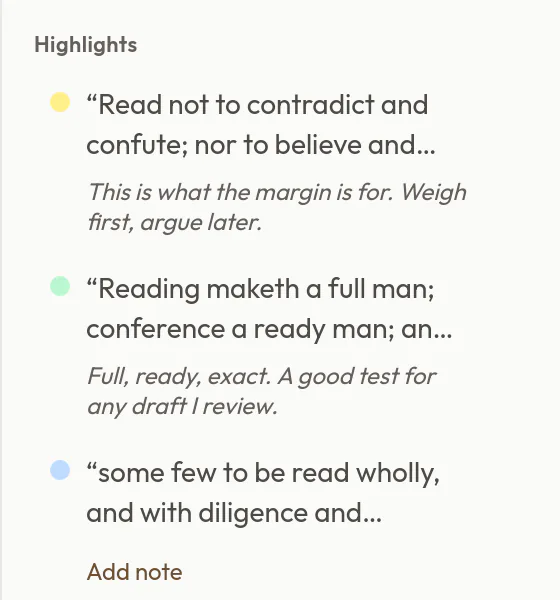
Write down why it caught your eye. Every highlight and note is listed beside the page, so you can find it again.
Take them with you
Export writes an ordinary Markdown file: each highlight as a quote, with its color and your note beneath it. It reads cleanly in Bindars or any Markdown app, and Bindars can print it or save it as a PDF.
Of Studies-annotations.md Highlights & notes: Of Studies.md
Exported from Bindars on Sep 27, 2026
Bookmarks
- Three kinds of books
Highlights
Of Studies
“Read not to contradict and confute; nor to believe and take for granted; nor to find talk and discourse; but to weigh and consider.”— yellow highlight
Note: This is what the margin is for. Weigh first, argue later.
“Reading maketh a full man; conference a ready man; and writing an exact man.”— green highlight
Note: Full, ready, exact. A good test for any draft I review.
“some few to be read wholly, and with diligence and attention”— blue highlight

Read your way
Choose from four themes and six fonts, and set the text size, line height, and spacing. The fonts include Atkinson Hyperlegible, designed by the Braille Institute for low-vision readers, and OpenDyslexic, for readers who prefer it.
Light
Sepia
Dark
Midnight
For screenwriters: the notes pass
Read your Fountain draft the way a reader will, in script layout and in Read mode, so you don't start rewriting mid-scene. Highlight what isn't working, add notes, and export the list to keep open beside Beat, Highland, or whatever you write in.

- Who talks most?
- Dialogue word counts and estimated speaking time for each character.
- How long does it run?
- Page and runtime estimates for each scene and for the whole script.
- Where does one character go?
- Character focus follows a single character through the script.
- Where are we?
- Scenes listed with interior or exterior, location, and time of day.
Technical documents too
Tables, code, math, and diagrams appear formatted, not as raw symbols.

- Tables, task lists, footnotes, and strikethrough (GitHub Flavored Markdown)
- Code blocks with syntax highlighting
- Math written in LaTeX between $$ signs, rendered with KaTeX
- Mermaid diagrams, drawn in place
A whole folder at once
Choose a folder of up to 5,000 documents. Find files, headings, and passages from one box, and see which files link to or mention the one you're reading.

Search the folder with Ctrl+K. Press ? in the app for the list of keyboard shortcuts.
Questions
Do I need to know Markdown?
No. Opening, reading, highlighting, and adding notes work without it. Edit mode shows the file as it's written, so you'll see Markdown's symbols there: # before a heading, * around emphasis.
Which files does it open?
.md, .markdown, and .fountain files. It doesn't open Word, PDF, or Pages documents. You can also paste text into a new document, which Bindars saves as an ordinary .md file.
Where are my highlights and notes kept?
On your computer, separate from the document, so the file itself never changes. They're linked to the file's location: if you rename or move the file, its highlights and notes don't follow it. Export them as Markdown to keep a copy.
What happens to my highlights if I edit the file?
They stay in place as long as the highlighted words and the text around them are unchanged. If you edit near a highlight, Bindars doesn't guess where it went: the note stays in Highlights & notes, marked “Location uncertain,” and you can still edit or export it.
Can I print a document or save it as a PDF?
Yes. Choose Print to PDF (Ctrl+P) to print or save a PDF. Printing a document doesn't include your notes; to get them as a PDF, export them and print the exported file.
Does it work with an Obsidian vault?
Bindars opens and searches the Markdown files in a vault. Obsidian's own syntax, such as [[wiki links]] and ==highlights==, shows as plain text.
Is there a Mac version?
It's being prepared, for Apple Silicon Macs running macOS 15 or later. To hear when it ships, follow the release feed (RSS) or watch releases on GitHub.
Which Linux systems does it run on?
The release is a .deb package for x86_64. Each release is installed and launched on Ubuntu 22.04 before publishing; Debian 12 or newer and current Linux Mint are expected to work.
Does Bindars connect to the internet?
No. It makes no network connections: no account, no analytics, no update checks.
Is it really free?
Yes. Bindars is open source under the MIT license, with no paid tier.
Get Bindars
Free and open source. No account, and Bindars never uploads your files.
Install the downloaded file with:
sudo apt install ./Bindars_*_amd64.debLinux: for Debian, Ubuntu, and Linux Mint on x86_64.
Mac: for Apple Silicon and macOS 15 or later, once it ships. To hear when it does, follow the release feed (RSS).
View release notes